
Last updated on
Oct 2, 2026
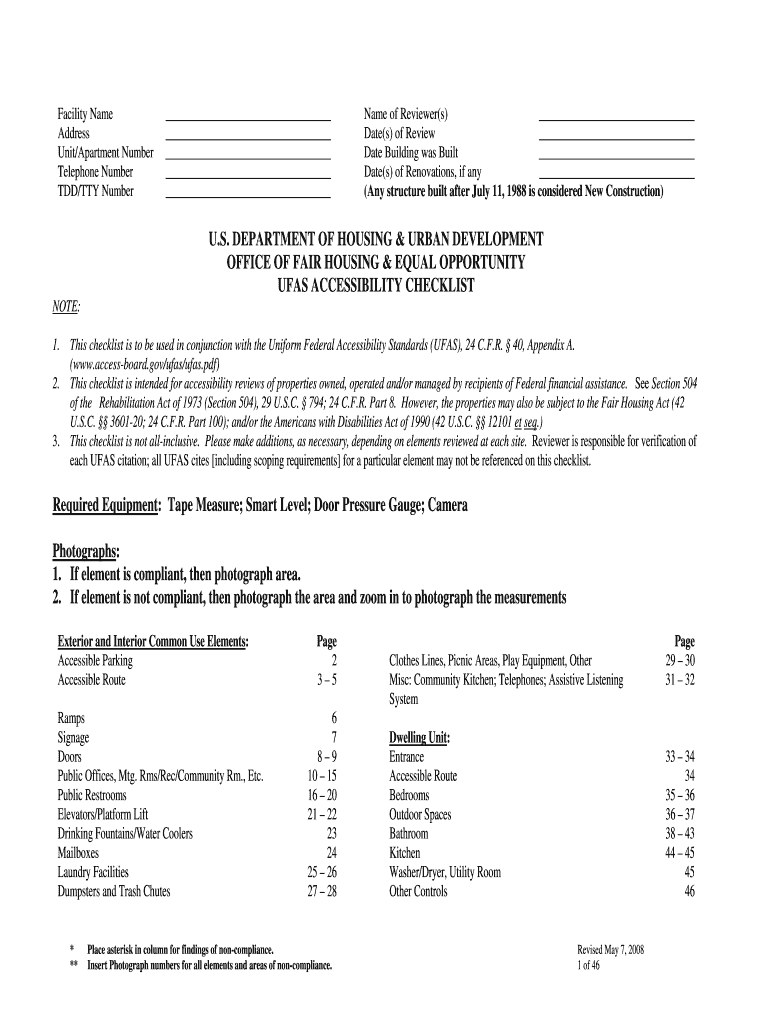
HUD UFAS Accessibility Checklist 2008-2026 free printable template
pdfFiller is not affiliated with any government organization

Fill out
Complete the form online in a simple drag-and-drop editor.

eSign
Add your legally binding signature or send the form for signing.

Share
Share the form via a link, letting anyone fill it out from any device.

Export
Download, print, email, or move the form to your cloud storage.
Why pdfFiller is the best tool for your documents and forms


End-to-end document management
From editing and signing to collaboration and tracking, pdfFiller has everything you need to get your documents done quickly and efficiently.
Accessible from anywhere
pdfFiller is fully cloud-based. This means you can edit, sign, and share documents from anywhere using your computer, smartphone, or tablet.
Secure and compliant
pdfFiller lets you securely manage documents following global laws like ESIGN, CCPA, and GDPR. It's also HIPAA and SOC 2 compliant.
What is HUD UFAS Accessibility Checklist
The UFAS Accessibility Checklist is a government form used by reviewers to assess property accessibility for compliance with Federal standards.
pdfFiller scores top ratings on review platforms




Who needs HUD UFAS Accessibility Checklist?
Explore how professionals across industries use pdfFiller.

HUD UFAS Accessibility Checklist is needed by:
-
Property owners receiving Federal financial assistance
-
Accessibility compliance reviewers
-
Federal housing agency representatives
-
Building permit applicants
-
HUD officials overseeing accessibility standards
-
Contractors involved in property rehabilitation
Comprehensive Guide to HUD UFAS Accessibility Checklist
What is the UFAS Accessibility Checklist?
The UFAS Accessibility Checklist is a critical tool designed to assess the accessibility of properties that are owned, operated, and managed by recipients of federal financial assistance. This checklist facilitates compliance with the Uniform Federal Accessibility Standards (UFAS) and intersects with key regulations like the Fair Housing Act and the Americans with Disabilities Act. By ensuring properties meet these standards, the checklist plays a significant role in promoting federal housing accessibility.
For properties receiving federal financial assistance, the UFAS Accessibility Checklist serves as a vital resource, ensuring that they adhere to necessary accessibility compliance standards. Utilizing this accessibility compliance form not only underscores legal adherence but also enhances the living experiences of individuals with disabilities.
Purpose and Benefits of Using the UFAS Accessibility Checklist
The primary purpose of the UFAS Accessibility Checklist is to aid property reviewers in verifying accessibility standards are met. This form ensures that properties are compliant with legal requirements, promoting a safe and accessible environment for all residents.
-
Facilitates thorough checks of accessibility features in properties.
-
Helps maintain legal compliance with housing accessibility standards.
-
Positively affects residents who benefit from accessible living conditions.
By utilizing the checklist, property managers can not only safeguard compliance but also enhance the overall quality of life for individuals who depend on accessible features.
Who Needs the UFAS Accessibility Checklist?
The UFAS Accessibility Checklist is primarily intended for various stakeholders in the housing sector. Key users include property managers, compliance officers, and any individuals involved in the evaluation of a property’s accessibility.
Moreover, groups petitioning for federal funds or grants can significantly benefit from the detailed documentation provided by this checklist. It is also crucial for construction and remodel projects, where accessibility compliance is necessary to obtain a building permit application.
How to Fill Out the UFAS Accessibility Checklist Online
Completing the UFAS Accessibility Checklist online can be a straightforward process when using pdfFiller. Follow these steps to ensure proper completion:
-
Access the UFAS Accessibility Checklist through pdfFiller.
-
Gather necessary measurements and data pertaining to the property.
-
Fill out the form accurately, ensuring all fields are completed.
-
Review the form for any common errors before submission.
Addressing frequent errors and understanding the form’s requirements enhances accuracy, ensuring that essential details are not overlooked.
Key Features and Sections of the UFAS Accessibility Checklist
The UFAS Accessibility Checklist consists of several important sections designed for comprehensive assessments of property accessibility. Key areas include accessible parking, routes, ramps, and other essential features.
-
Fields for entering specific measurements related to accessibility.
-
Sections for comments and photographs to support each accessibility feature.
-
Verification sections that require accurate assessments of each UFAS citation.
Understanding these components is vital for a thorough review process and ensures compliance with HUD accessibility checklist criteria.
Submission Methods and Next Steps After Completing the Checklist
After completing the UFAS Accessibility Checklist, submission can be accomplished through various methods. Typically, forms can be sent electronically or via traditional mail to the relevant authorities.
Post-submission, it is crucial to follow up with confirmation of receipt and tracking status. If the checklist faces rejection or necessitates amendments, users should be prepared to correct any identified issues promptly.
Understanding Security and Compliance when Using the UFAS Accessibility Checklist
When handling the UFAS Accessibility Checklist, data security and compliance are paramount. It’s essential to protect sensitive information pertaining to accessibility and compliance checks.
This checklist is designed to comply with security measures such as HIPAA, GDPR, and other relevant standards, ensuring users can safely manage their documents. With pdfFiller’s robust security features, including 256-bit encryption, users can confidently complete forms knowing their data is protected.
Using pdfFiller to Enhance Your Experience with the UFAS Accessibility Checklist
Utilizing pdfFiller for the UFAS Accessibility Checklist simplifies the process significantly. The platform offers a user-friendly interface that makes filling, editing, and sharing the checklist straightforward.
-
Tools for efficient editing and highlighting important sections.
-
Options for eSigning to streamline finalization.
-
Secure storage for completed documents, ensuring easy future access.
Leveraging these features enhances overall efficiency and accuracy in managing the UFAS Accessibility Checklist.
How to fill out the HUD UFAS Accessibility Checklist
-
1.Begin by accessing the UFAS Accessibility Checklist on pdfFiller. Use the search function to find the form quickly.
-
2.Once the form opens, familiarize yourself with the layout and sections available. Each section corresponds to different accessibility elements.
-
3.Before completing the form, gather necessary information such as measurements, comments, and photographs of the accessibility features at the property.
-
4.Navigate to each blank field within the form. Click inside the field and start inputting the appropriate data. Utilize pdfFiller's editing tools for clarity and organization.
-
5.Record precise measurements and notes for each accessibility feature like parking spots, routes, and ramps as required by the form.
-
6.After filling out all fields, review your inputs to ensure accuracy and completeness. Check that all UFAS citations are verified and justified.
-
7.Once satisfied, follow the prompts to finalize the form. You may save it on pdfFiller for future reference or download it for submission.
-
8.To submit the completed checklist, use the designated submission features on pdfFiller. Choose your preferred method, whether email or direct upload.

What are the eligibility requirements for using the UFAS Accessibility Checklist?
The UFAS Accessibility Checklist is intended for properties owned or operated by recipients of Federal financial assistance. Ensure that you are eligible under the Uniform Federal Accessibility Standards guidelines.
Is there a deadline for submitting the UFAS Accessibility Checklist?
Though specific deadlines can vary, it is generally recommended to submit the checklist as part of the building permit application process or before project completion to ensure compliance.
How do I submit the completed UFAS Accessibility Checklist?
You can submit the completed checklist by following the submission instructions on pdfFiller, which typically include sharing via email or uploading directly to the relevant Federal agency's portal.
What supporting documents are needed when submitting this form?
Supporting documents can include site plans, photographs of accessible features, and any related accessibility assessments. Gather these before filling out the checklist for a smoother process.
What are common mistakes to avoid when filling out the checklist?
Common mistakes include omitting measurements, not verifying UFAS citations, and failing to provide clear photographs. Double-check all entries before finalizing the form to avoid these issues.
What is the processing time for the UFAS Accessibility Checklist?
Processing times can vary by agency, but expect a few weeks for review after submission. Stay in contact with the relevant authority for updates to your application status.
Can I request assistance while filling out the UFAS Accessibility Checklist?
Yes, if you're uncertain about certain sections or need guidance, consider contacting your local housing authority or an accessibility consultant for assistance in completing the form.
Related Forms




Related Catalogs
Get the latest insights from our blog


If you believe that this page should be taken down, please follow our DMCA take down process
here
.
This form may include fields for payment information. Data entered in these fields is not covered by PCI DSS compliance.